
Cash & Cards
How Can Foreign Travelers Withdraw RMB From a Chinese ATM With a Foreign Debit Card?
Learn how to find a compatible Chinese ATM, withdraw RMB with a foreign debit card, understand fees and troubleshoot failed withdrawals.
Quick Answer: Match the ATM Network, Then Withdraw in RMB
A foreign-issued debit card can withdraw RMB from a Chinese ATM when the ATM supports the card network, the issuing bank allows overseas cash withdrawals, and the amount fits both sides' limits.
Check the network mark on the card, then use an ATM showing the same network, such as Visa or Plus, Mastercard or Cirrus, UnionPay, JCB, American Express, or another network used by your card.
Choose a normal bank ATM when possible. At the machine, select English, choose cash withdrawal, enter the card PIN, select the correct account type, and request RMB. When the ATM offers to charge the withdrawal in your home currency, normally decline that conversion and continue in RMB.
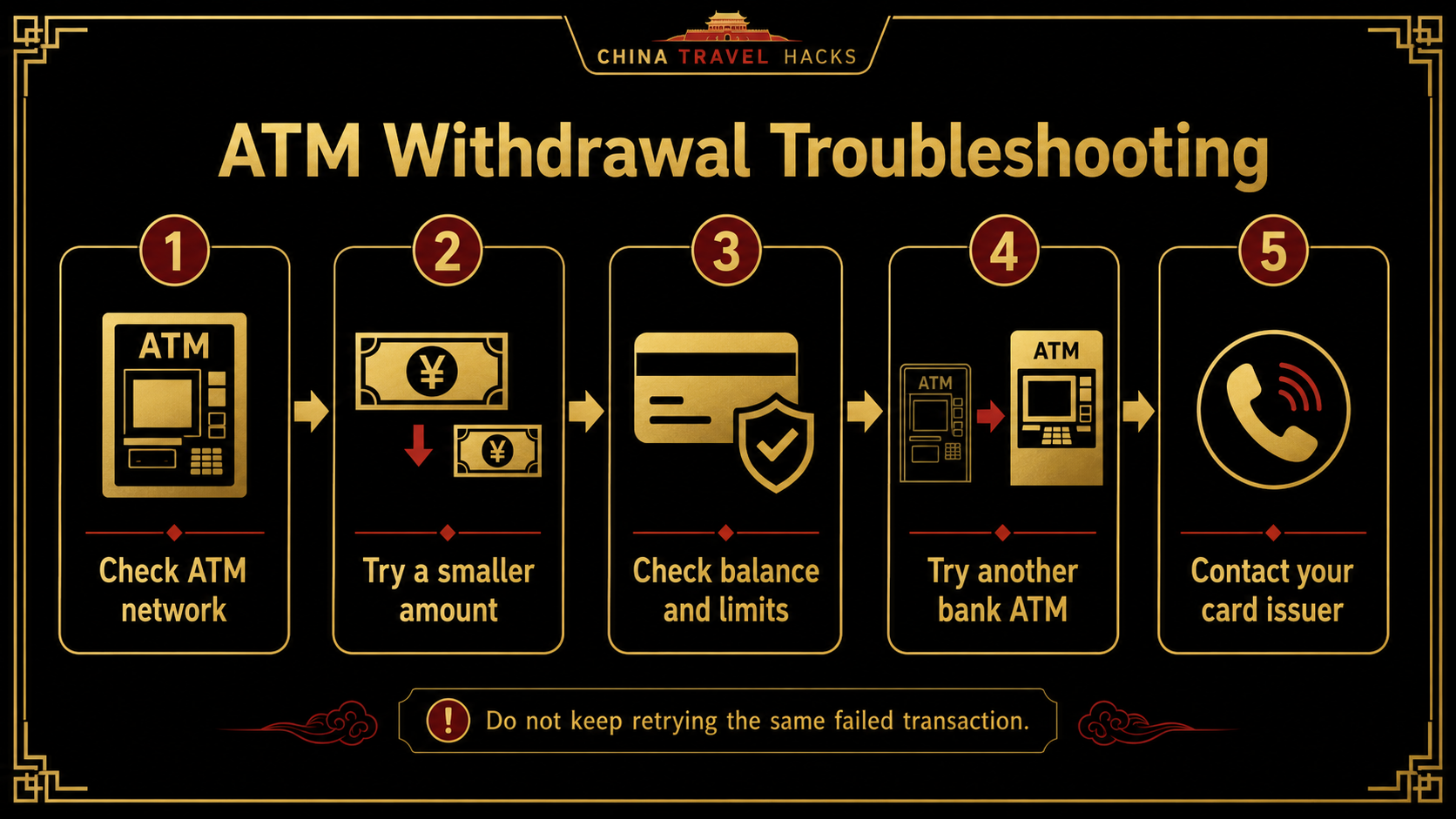
If the withdrawal fails, do not repeat the same request. Check compatibility, try one smaller amount, review the balance and limits, then move to another compatible bank ATM. Contact the issuing bank when several compatible machines fail or the banking app shows a security block.
Check the Debit Card Before Departure
Before relying on the card in China, confirm that:
- overseas ATM withdrawals are enabled;
- transactions in China are allowed;
- you know the daily and per-withdrawal limits;
- the account has enough balance for the withdrawal and fees;
- you know the ATM and foreign-currency charges;
- the banking app works abroad;
- you can receive any security code or approval request;
- the PIN is correct.
A card that works in Alipay or WeChat Pay may still fail at an ATM because merchant payments and cash withdrawals use different permissions.
Bring a second physical card from another bank and keep it separately. If the main card is blocked, damaged, lost, or retained, the second card protects the rest of the trip.
For the wider card setup, check whether your debit card is ready for China payments.
Credit-card ATM withdrawals are cash advances and may carry different fees and interest. This article focuses on debit cards linked to your own account balance.
Find a Compatible Bank ATM
Look at the network mark on the physical card before choosing the machine.
Common examples include:
- Visa or Plus;
- Mastercard, Maestro, or Cirrus;
- UnionPay;
- JCB;
- American Express.
Use an ATM displaying the corresponding mark. That shows possible network compatibility; the issuing bank still decides whether to approve the withdrawal.
Choose an ATM:
- beside or inside a normal bank branch;
- with a clear bank name and support number;
- with an English-language option;
- in a well-lit public location;
- without anything unusual around the card slot.
A bank-branch ATM is easier to deal with if the card is retained or the machine reports an error.
Limits differ by ATM owner, machine, network, account, and foreign issuer. Bank of China currently gives foreign cards a RMB 3,000 single-withdrawal limit at its ATMs, but that is one bank's rule, not a nationwide standard.
Withdraw RMB and Choose the Currency Carefully
ATM menus differ, but the basic flow is usually:
- Insert or present the card as instructed.
- Choose English.
- Enter the PIN.
- Select
Cash Withdrawal. - Choose the account type linked to the card.
- Enter the RMB amount.
- Review any fee and conversion screen.
- Confirm the transaction.
- Wait until the card, cash, and receipt have all been returned.
The account menu may show Checking, Current, or Savings. Choose the option that matches your account. Confirm this with the issuing bank before travel when you are unsure.
For the first withdrawal, use a moderate amount rather than the highest amount shown. A smaller request is less likely to exceed the ATM's single-transaction limit or the issuer's overseas limit.
When the ATM asks whether to charge the withdrawal in your home currency, look for options such as:
Continue in RMB;Local Currency;Without Conversion;Decline Conversion.
Choosing your home currency lets the ATM operator perform dynamic currency conversion, or DCC. The screen should show the exchange rate and any markup.
For most travelers, choosing RMB and declining the ATM conversion is the simpler option. The card network and issuing bank then handle the currency conversion under the card's terms.
Understand the Possible Fees
A withdrawal may include several separate costs.
ATM operator fee
The ATM may display its own fee before final confirmation. You can cancel if the charge is not acceptable.
Issuing-bank withdrawal fee
Your home bank may charge a fixed fee for using an overseas ATM.
Foreign-currency fee
The issuing bank may add a percentage or conversion charge when the RMB withdrawal reaches the account.
Dynamic currency conversion
DCC applies when the ATM offers to charge the withdrawal in your home currency. Its rate or markup comes from the ATM conversion provider.
Declining DCC does not remove every fee. It only avoids that ATM-side currency conversion.
If the Withdrawal Fails, Follow This Order
A declined transaction can have several causes. Use the shortest checks first.
| What happened | What to do next |
|---|---|
| The ATM does not show your card network | Find a machine with the correct network mark |
| A high amount is declined | Try one smaller amount |
| The screen reports insufficient funds | Check that the balance also covers fees |
| The transaction is not permitted | Check overseas ATM withdrawal settings |
| The limit is exceeded | Review ATM and issuer limits |
| The bank app shows a security alert | Approve it or contact the issuer |
| The same ATM declines a normal request | Stop retrying and use another bank's ATM |
| Several compatible ATMs decline the card | Stop and contact the issuing bank |
Try a smaller amount when the machine recognizes the card and reaches the withdrawal stage, but a higher request is declined.
Change ATMs when the required network mark is missing, the machine reports a system error, it cannot dispense the requested cash, or one normal request and one smaller request both fail.
Contact the issuer when several compatible ATMs fail, overseas cash permissions are unclear, the card appears locked, the PIN is rejected, or the bank requests verification.
Do not keep entering the PIN or submitting the same failed request. Repeated attempts can trigger a security block.
If the ATM keeps the card: stay beside the machine. Record the bank name, location, ATM identification number, time, and screen message. Speak to branch staff immediately when the branch is open, or call the ATM owner's number printed on the machine. Freeze the card in the banking app when recovery is uncertain, and contact the issuing bank. Never share the PIN, full card number, banking password, or verification code with anyone offering unofficial help.
Keep ATM Cash as One Part of the Payment Plan
ATM cash is useful, but it should not carry the whole trip.
Prepare:
- Alipay or WeChat Pay for everyday mobile payment;
- one main debit card;
- a second card from another issuer;
- some RMB cash;
- working internet and access to bank verification.
Use the wider guide to build a complete China payment backup.
Chinese ATMs may dispense mainly RMB 100 notes. These can be inconvenient for a bottle of water or another very small purchase. After withdrawing, carry useful RMB denominations after withdrawing cash.
Before departure, save the issuer's international support number and learn where the card-freeze control is inside the banking app.
The practical rule is simple:
Match the ATM network, withdraw in RMB, avoid unnecessary conversion, and stop repeating the same failed transaction.
Travelers who want their Alipay, WeChat Pay, physical cards, ATM cash plan, internet, first-night hotel, and arrival transport checked together can use the China Arrival Readiness Review. The US$69.90 review checks practical readiness from landing in mainland China through reaching the first-night accommodation.
Last updated: August 2, 2026. Travel platforms, entry rules, app behavior, prices, and service availability can change. Re-check official sources before departure.
Discussion
Ask a question, share recent experience, or flag information that may be outdated.
0 visible comments
No discussions yet.