
Blocked Apps
Why Do International Apps Work on a Travel eSIM but Fail on Hotel or Public Wi-Fi in China?
Learn why international apps may work on a China travel eSIM but fail on hotel or public Wi-Fi, how to identify the network problem and what to do next.
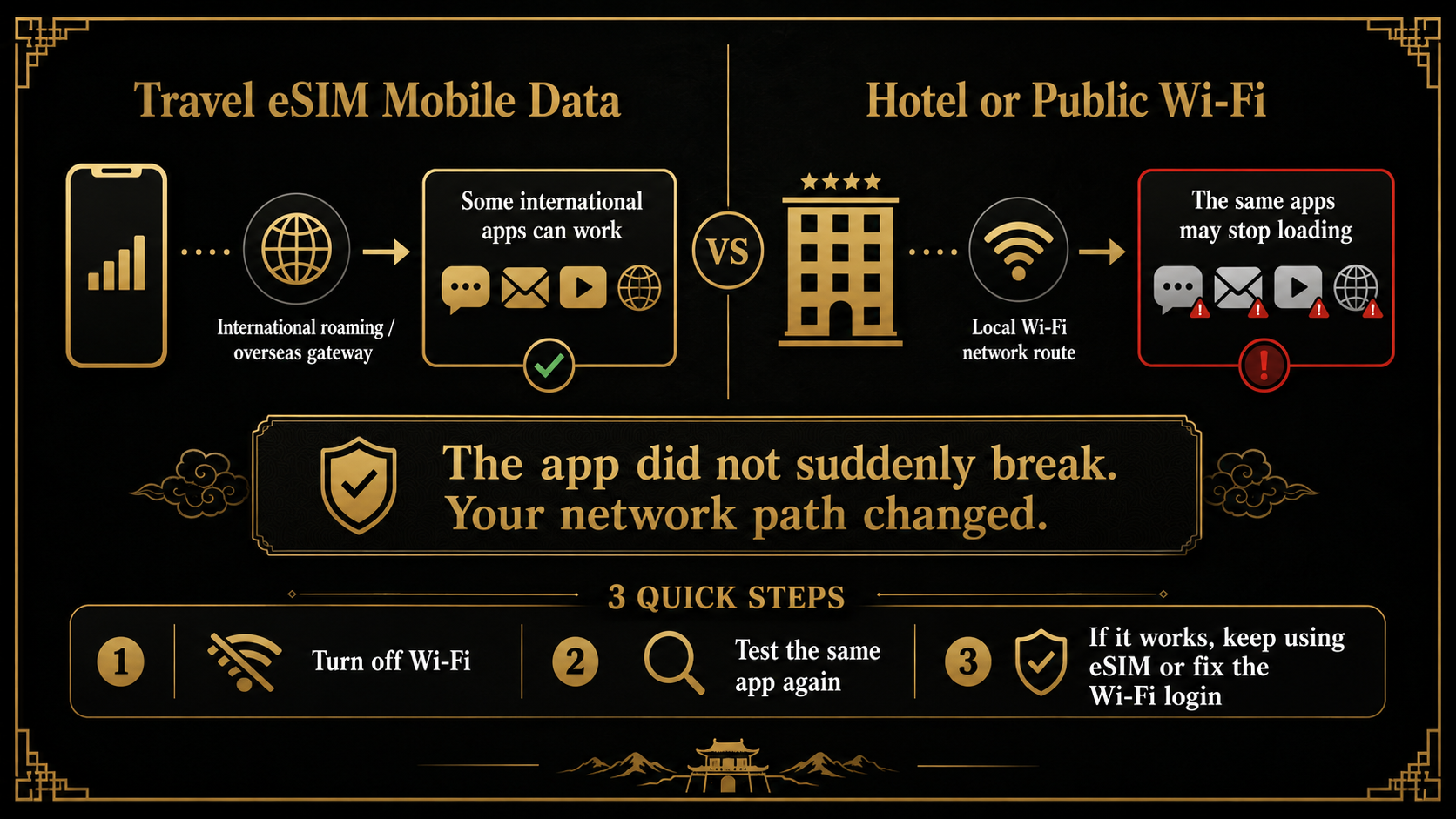
Quick Answer: Connecting to Wi-Fi Changes the Network Route
When an international app works on your travel eSIM but stops loading on hotel, airport, café, or public Wi-Fi in China, the app usually has not broken and the eSIM has not suddenly failed.
Your phone has changed connections.
Some China travel eSIM products send mobile data through international roaming or an overseas gateway. Airalo currently describes this for its China, Asia, and global eSIMs, while Nomad says its current China eSIM can reach services such as Google, WhatsApp, and Facebook without a separate external VPN.
That does not mean every travel eSIM works the same way, and it does not mean the eSIM changes how hotel Wi-Fi works.
Once the phone joins a Chinese Wi-Fi network, app traffic normally uses that Wi-Fi instead of the travel eSIM. The eSIM's mobile-data route does not carry over to the hotel connection.
The fastest test is simple:
- turn Wi-Fi fully off;
- confirm the travel eSIM is selected for mobile data;
- open the same app again.
If it starts working immediately, keep using the eSIM. The problem is the Wi-Fi route, not the app.
Travel eSIM and Hotel Wi-Fi Are Two Separate Connections
The difference is easier to understand when the two routes are placed side by side:
| Connection in use | Where the phone sends app traffic | What may happen |
|---|---|---|
| Travel eSIM mobile data | The eSIM provider's roaming or international data route | Some international apps may work normally |
| Hotel or public Wi-Fi | The local Wi-Fi provider's internet route | Some international apps may stop loading |
| Wi-Fi connected but not logged in | The phone reaches the router but not the internet | Almost every app and webpage may fail |
The advantage of a travel eSIM only applies while the phone is actually using that eSIM for mobile data.
Do not assume the product has a universal “built-in VPN” that also covers Wi-Fi. Providers use different technical arrangements and marketing terms. Check the current product page for the exact eSIM you bought.
Some international services may be unavailable on mainland Chinese local networks, including Google, Facebook, YouTube, and X. Other services can behave differently by network, app version, or current conditions.
The practical point is not to diagnose the entire internet system. It is to identify which connection the phone is using and choose the route that completes the task.
Use the One-Minute Wi-Fi Test
When an app stops loading after you join Wi-Fi, test the same app on one connection at a time.
Result 1: The app works after Wi-Fi is turned off
The travel eSIM is working. Continue on mobile data when you need that international service.
There is no reason to delete the eSIM, reinstall the app, or change the eSIM settings.
Result 2: The app still fails after Wi-Fi is turned off
Now check the travel eSIM itself:
- the eSIM line is switched on;
- it is selected as the mobile-data line;
- data roaming is set as the provider requires;
- the plan covers mainland China;
- the plan is active and still has data;
- any required APN is correct.
Result 3: Nothing works on Wi-Fi
This usually means the Wi-Fi has not completed its login or does not currently have internet access.
Turn off features such as Wi-Fi Assist or smart network switching while testing. Otherwise, the phone may quietly use cellular data when Wi-Fi is weak, making it difficult to tell which connection produced the result.
For the broader choice between mobile data, roaming, local SIM, Wi-Fi, and VPN, compare eSIM, roaming, local SIM, hotel Wi-Fi and VPN options.
Wi-Fi Can Be Connected Without Being Online
A Wi-Fi symbol at the top of the screen only confirms that the phone joined the wireless network. The hotel or public network may still require another step.
Open a normal webpage in the browser and look for a login screen. You may need to:
- accept the terms;
- enter the Wi-Fi password;
- provide a room number and guest name;
- enter a username;
- complete phone-number or verification-code access;
- tap a final
ConnectorLog inbutton.
If the login page does not appear, disconnect and reconnect to the network, open a new webpage, and confirm the correct Wi-Fi name with the hotel.
Test three things after logging in:
- a normal webpage;
- a China-based page or app;
- the international app you actually need.
If all three fail, ask the hotel whether the network is down.
If normal pages work but only some international apps fail, the Wi-Fi is online. It simply does not provide the same route as the travel eSIM. Switching back to mobile data is normally the shortest solution.
Public Wi-Fi can also create privacy and security concerns. Avoid handling sensitive banking or account changes on an open network unless you understand and trust the connection.
If Mobile Data Also Fails, Check the eSIM Instead
Only troubleshoot the eSIM after Wi-Fi has been completely turned off and the same app still fails.
Use this order:
- confirm the travel eSIM line is on;
- select it for mobile data;
- enable data roaming when required;
- check plan status, validity, and remaining data;
- confirm mainland China is included;
- check the provider's APN instructions;
- use airplane mode briefly, then reconnect;
- restart the phone and wait for network registration.
Do not delete the eSIM as the first response. Some profiles or QR codes are intended for one installation, so deleting a working profile can create a second problem.
For the full setup sequence, install and activate your China travel eSIM correctly.
A data-only eSIM also may not provide a mainland Chinese number, local SMS, or ordinary calls. Use the separate guide to understand what a data-only travel eSIM can and cannot do.
Use a Phone Hotspot for a Laptop or Tablet
A laptop or tablet connected directly to Chinese hotel Wi-Fi can face the same network-route problem.
When the travel eSIM works on the phone and the device and plan allow tethering, turn on the phone's personal hotspot and connect the laptop or tablet to it.
The second device then uses the phone's eSIM mobile data instead of the hotel Wi-Fi.
Before relying on this option, check:
- the plan allows hotspot use;
- there is no separate hotspot limit;
- the phone has enough battery;
- laptop updates and cloud syncing are paused;
- the data allowance is large enough for the task.
Before departure, confirm that the exact eSIM supports mainland China, the international services you need, and personal hotspot use. Also save the APN instructions and support route.
Use the China Internet Setup Guide to build the complete mobile-data, Wi-Fi, and backup arrangement.
Remember these three decisions:
The app works after Wi-Fi is turned off: keep using the travel eSIM. Nothing works on Wi-Fi: finish the login or ask the hotel about the network. The app still fails on mobile data: check the eSIM settings and plan.
Travelers who want their phone, eSIM, home line, required apps, first-night hotel, and arrival transport checked together can use the China Arrival Readiness Review. The US$69.90 review checks the practical network and arrival setup without guaranteeing that any eSIM, Wi-Fi network, VPN, or third-party app will remain available.
Last updated: August 3, 2026. Travel platforms, entry rules, app behavior, prices, and service availability can change. Re-check official sources before departure.
Discussion
Ask a question, share recent experience, or flag information that may be outdated.
0 visible comments
No discussions yet.