
eSIM
Should You Install a China Travel eSIM Before Departure, or Can You Activate It After Arrival?
Learn when to install and activate a China travel eSIM, when the plan may start counting, and what settings to turn on after landing.
Quick Answer: Install Before Departure, Turn It On After Landing
For a first trip to China, buy and install your travel eSIM before departure while you still have reliable Wi-Fi, easy access to your email, and time to fix a problem.
Before installing it, check the plan’s Activation Policy or Validity Policy. Many travel eSIM plans start when they first connect to a supported network in China. Others may start on installation, manual activation, purchase, a selected date, or an automatic activation deadline.
After landing, the setup should be short:
- turn off airplane mode;
- turn on the travel eSIM line;
- select it for mobile data;
- enable data roaming if the provider requires it;
- open a map or hotel booking to confirm that data works.
Installing after arrival is possible only when you already have another working connection. That makes it a backup option, not the best main plan.
Your first night may depend on maps, Alipay, Didi, translation, hotel messages, and transport details. Finish the network setup and open the essential apps before the flight so landing in China is not the first time you discover a problem.
Installation, Connection, and Plan Validity Are Different
A travel eSIM moves through several stages:
| Stage | What it means |
|---|---|
| Buy the plan | You receive the package, QR code, or installation link |
| Install the profile | The eSIM configuration is added to the phone |
| Turn on the line | The phone is allowed to use that eSIM |
| Connect to a network | The eSIM joins a supported mobile network |
| Start the validity period | The plan begins counting under its own policy |
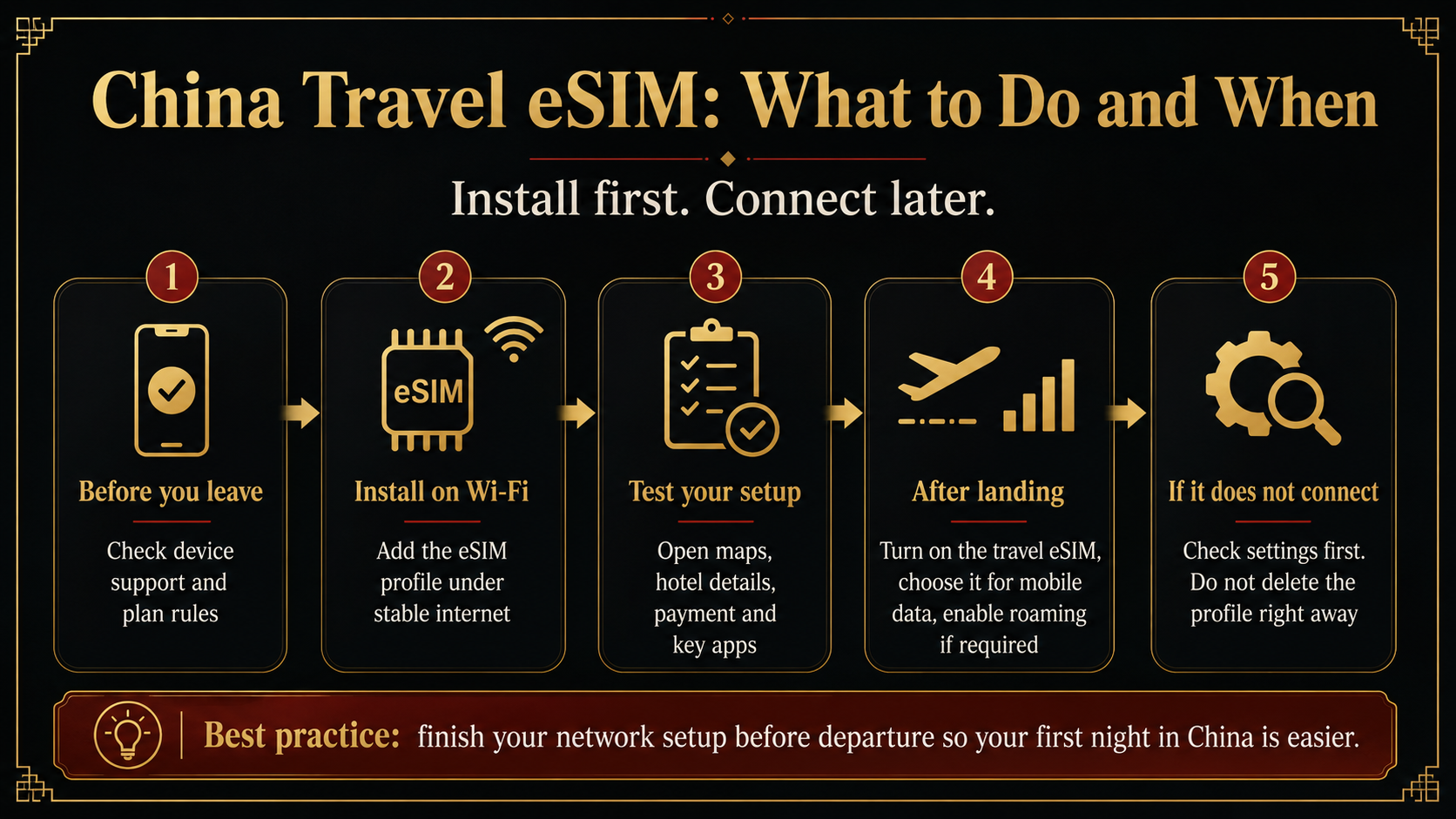
Seeing the eSIM in phone settings confirms that the profile was installed. The provider’s account page or plan policy tells you when the 7-day, 10-day, or 30-day validity period begins.
Look for wording such as:
- Activation Policy
- Validity Policy
- Activate on arrival
- Manual activation
- Activate within a set number of days
Regional and global plans need extra care. When the plan also covers your departure country or transit country, turning it on early may let it connect before you reach China.
What to Finish Before Departure
First confirm that:
- the exact phone model supports eSIM;
- the version sold in your purchase region supports eSIM;
- the phone is carrier-unlocked;
- the plan covers mainland China;
- the phone can store another eSIM profile.
Install the profile using stable home Wi-Fi or another reliable connection.
After installation:
- name the line
China Travel; - save the order number;
- save the QR code or manual installation details;
- screenshot the activation rules;
- check whether data roaming is required;
- check whether the provider gives an APN setting;
- save the provider’s support route.
Then test the tools that may matter during the first night:
- search for the first-night hotel in your map;
- open the hotel booking and Chinese address;
- confirm that Alipay is logged in;
- open Didi and check the account;
- open the translation app;
- open flight, train, or transfer records;
- confirm that bank or account verification is still available.
This checks the phone, apps, logins, bookings, and saved information before they become urgent.
A data-only travel eSIM normally provides internet rather than a mainland Chinese phone number, local SMS, or ordinary calls. Use the separate guide to decide whether a data-only eSIM is enough for your China trip.
What to Do After Landing in China
When the profile is already installed, arrival setup should take only a few minutes.
Turn off airplane mode, open the SIM or mobile-network settings, and switch on the line labeled China Travel.
Then:
- choose
China Travelas the mobile-data line; - turn on data roaming for that line when the provider requires it;
- stop automatic data switching from moving data back to the home line;
- turn off Wi-Fi and open a map, webpage, or hotel booking.
The home SIM can remain available for bank and account verification while the travel eSIM handles data, provided the phone supports the combination and the home carrier can provide roaming service. Review the separate setup to keep your home number available while the travel eSIM handles data.
Keep the roles simple:
- Travel eSIM: mobile data
- Home SIM: existing number, verification texts, and necessary calls
Once data works, open the hotel address, maps, payment app, ride-hailing app, and arrival transport details. Then begin the journey to the hotel instead of continuing to adjust a working connection.
Can You Install the eSIM After Arrival?
Yes, but you need internet before you can install the internet plan.
Possible connections include:
- home-carrier roaming;
- working airport Wi-Fi;
- a companion’s hotspot;
- hotel Wi-Fi.
You also need access to the order email, provider app, QR code, or manual installation details.
This can become difficult at the airport. Wi-Fi may require a login page. International roaming may not be active. The QR code may be stored on the same phone that needs to scan it. Email or the provider account may ask for another verification code.
At the same time, maps, Didi, Alipay, hotel messages, and transport information are waiting for a connection.
Use arrival installation for an unexpected replacement plan or for a product whose instructions specifically require later installation. For the main plan, install before departure and leave only the final line settings for arrival.
Travelers still choosing between a travel eSIM, home roaming, a local SIM, and Wi-Fi can compare eSIM, roaming, local SIM and Wi-Fi for China.
If It Does Not Connect, Keep the eSIM Profile
When the line does not connect after landing, check:
- airplane mode is off;
- the travel eSIM line is on;
- the travel eSIM is selected for mobile data;
- data roaming matches the provider’s instructions;
- the plan covers mainland China;
- the activation date or window has started;
- the plan still has data and validity;
- network selection is automatic unless told otherwise;
- the APN matches the provider’s instructions;
- automatic data switching has not moved data back to the home SIM.
Then try airplane mode for several seconds, restart the phone, and allow a few minutes for network registration.
Keep the eSIM profile installed. Some QR codes or profiles are designed for one installation, and deleting the line can turn a connection problem into a replacement problem.
Before boarding, confirm that:
- the phone supports eSIM and is unlocked;
- the plan covers mainland China;
- the activation policy is clear;
- the profile is installed at the right time;
- the order and installation details are saved;
- the travel line’s roaming requirement is known;
- the home line will not take over mobile data;
- maps, Alipay, Didi, translation, and the hotel booking have been opened;
- the hotel address and booking are also saved offline;
- one temporary backup connection is available.
The practical rule is simple:
Finish the purchase, installation, app login, and testing before departure. After landing, turn on the travel line, confirm the connection, and begin the first-night journey.
Travelers who want their phone, home line, travel eSIM, verification access, essential apps, first-night hotel, and arrival transport checked together can use the China Arrival Readiness Review. The US$69.90 review checks practical readiness from landing in mainland China through reaching the first-night accommodation.
Last updated: August 1, 2026. Travel platforms, entry rules, app behavior, prices, and service availability can change. Re-check official sources before departure.
Discussion
Ask a question, share recent experience, or flag information that may be outdated.
0 visible comments
No discussions yet.