
Arrival Checklist
What Addresses, Bookings, QR Codes, and Contact Details Should You Save Offline Before Arriving in China?
Save the right China hotel addresses, booking confirmations, ticket details, QR codes and emergency contacts offline before your first arrival.
Quick Answer
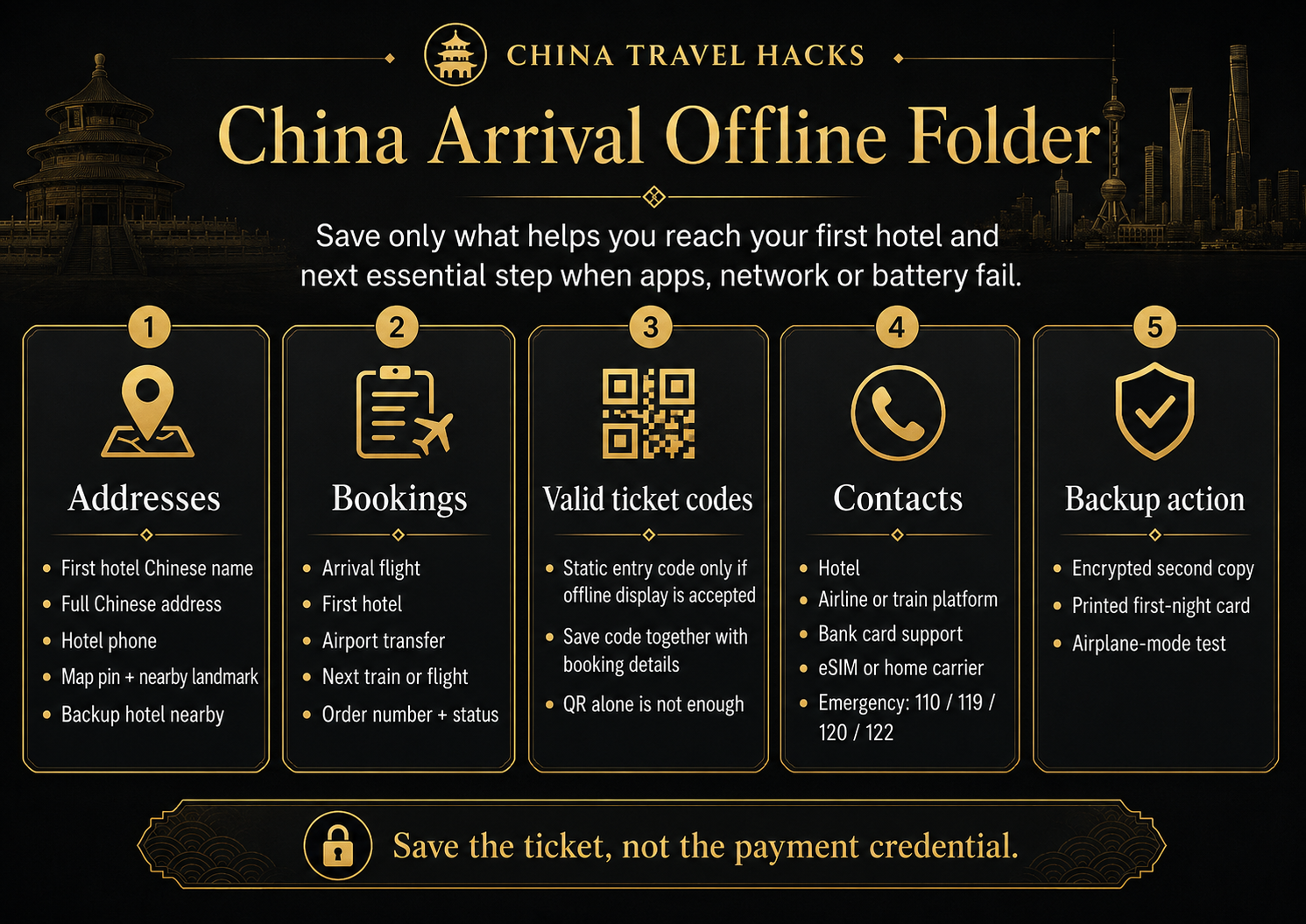
Before arriving in China, create one offline arrival folder with your first hotel’s Chinese and English names, full Chinese address, phone number, branch details, entrance notes, and map location; your arrival flight and transfer details; confirmed hotel, train, flight, and time-sensitive bookings; any static ticket codes the provider says can be shown offline; and the contacts you would need if the first-night plan breaks.
The goal is not to screenshot your entire trip. It is to keep the minimum information needed to get from the airport, station, or port to your first hotel—and then complete the next essential journey—without reopening the original app, loading email, or remembering a password.
A passport copy does not replace the original passport. A QR screenshot is not automatically valid. Order numbers and readable booking details are often more useful than a QR code by itself. Never treat payment codes, login codes, or one-time security codes as travel documents.
Build an Arrival Folder, Not a Screenshot Dump
My China Arrival Offline Folder is not a camera roll filled with hundreds of random screens.
It protects one short but important sequence:
Entry point → transfer → correct first hotel → check-in → next essential train, flight, or appointment
Every saved item should answer at least one practical question:
- Can I find the destination without internet?
- Can I show that the booking exists if the app asks me to log in again?
- Do I know who to contact when the order does not work?
- Can I understand this file without opening the original account?
- Does it help me take the next action?
If the answer is no, the screenshot probably does not belong in the arrival folder.
I suggest naming the files by the order in which you may need them:
00 First-Night Action Sheet
01 Passport and Entry
02 Arrival Flight
03 First Hotel
04 Airport Transfer
05 Next Train or Flight
06 Tickets and QR Codes
07 Contacts
08 Backup Plan
This is much easier than hunting through an album called “Trip.com screenshots” while standing outside an airport.
Apps still matter, but app preparation and offline preparation are different layers. Use the separate guide to prepare the core China travel apps before departure; then make sure the first-night essentials also exist outside those apps.
Which Addresses Must Be Saved Offline?
Your first hotel address is the one item I would never leave inside a booking app only.
Save:
- the hotel’s English name;
- the full Chinese name;
- the complete Chinese address;
- the public phone number;
- the city and district;
- the exact branch;
- the building, mall, tower, or apartment name;
- the correct entrance;
- a map pin;
- a nearby map screenshot with roads and landmarks.
The Chinese name and address matter because a taxi driver, airport worker, police officer, or passerby can usually use them more easily than an English brand name.
The branch matters because one hotel chain can have several properties in the same city. A brand name without the district, road, or branch can send you to the wrong place.
The entrance matters because the map pin may land in the middle of a shopping complex, office block, or residential compound. Save a short note such as “hotel lobby is inside Tower B” or “entrance is on the east side of the mall” when the property gives you that information.
A simple address card for a driver
Create one clean screen or printed card:
Please take me to this hotel.

Chinese hotel name:
English hotel name:
City and district:
Full Chinese address:
Hotel phone:
Exact branch:
Entrance note:
Nearby landmark:

I have a reservation for today.
Do not put your full passport number, payment details, or private booking credentials on the driver card.
Also save the precise name of the arrival point:
- airport or railway-station name;
- terminal;
- arrival hall;
- pickup area;
- meeting point;
- transfer-company contact.
“Shanghai airport” is not enough. You need to know which airport, which terminal, and where the pickup is supposed to happen.
For a late arrival, remote property, guesthouse, or self-check-in stay, I also save one nearby hotel with a staffed front desk as a backup destination. It does not need to be booked in advance; it simply gives you somewhere concrete to go if the first property is unreachable.
For passport check-in, late arrival, hotel location, and first-night backup planning, prepare the full first-hotel booking and check-in process.
Which Bookings Must Be Available Without the Original App?
Do not duplicate a three-week itinerary just because it exists.
Start with the bookings that would immediately stop the arrival sequence if you could not open them.
First priority: needed on arrival
Save offline:
- the flight arriving in China;
- the first-night hotel;
- airport or station transfer;
- any train, flight, ferry, or other transport that leaves that night or early the next morning.
Second priority: needed within 24 hours
Depending on the trip, save:
- the next intercity train or flight;
- a timed attraction within the first day;
- self-check-in instructions;
- door codes or key-pickup instructions that are safe and intended for the guest;
- an appointment that cannot easily be recreated.
Every saved booking should show:
- current order status;
- order or confirmation number;
- traveler or guest name;
- date;
- time;
- exact place;
- service purchased;
- payment status;
- provider or platform contact.
The status is not a decorative label. It tells you whether the booking can actually be used.
Pending, reservation submitted, confirmed, paid, and ticket issued do not all mean the same thing. A hotel may be confirmed while a train pre-order is still waiting for issuance. Save the status in plain text rather than relying on a vague green checkmark.
A common arrival problem is that the hotel app asks the traveler to sign in again. If the traveler still has the order number, guest name, payment status, arrival date, and written late-arrival confirmation, the front desk has something useful to search.
A screenshot that only says “Booking confirmed” without the hotel, date, name, or order number is a weak backup.
Save Train, Flight and Hotel Details—Not Only the Confirmation Screen
Train details
Save:
- train number;
- full Chinese and English station names;
- date and departure time;
- seat class;
- carriage and seat or berth, when assigned;
- order number;
- issuing status;
- booking platform and support route.
A reservation request, waitlist, or pending purchase is not the same as an issued ticket.
The screenshot is only a reference. A foreign-passport traveler still needs the valid original passport used for the booking when traveling. For the full booking, station, issuance, and passport-boarding process, check the full China train booking and passport-boarding process.
Flight details
Save:
- flight number;
- travel date;
- departure and arrival airports;
- terminal;
- PNR or booking reference;
- baggage allowance;
- connection details;
- airport transfer information.
Do not assume that every airline accepts a screenshot of a boarding pass. Save the booking reference and readable flight details even when you also keep the pass.
Hotel details
For the first hotel, save:
- confirmed status;
- check-in and checkout dates;
- guest name;
- room type;
- prepaid or pay-at-property status;
- deposit or remaining-payment note;
- order number;
- written late-arrival confirmation;
- no-show terms;
- front-desk hours;
- self-check-in and access instructions.
A hotel screenshot does not replace the valid original passport needed for check-in.
Which QR Codes Should—and Should Not—Be Saved?
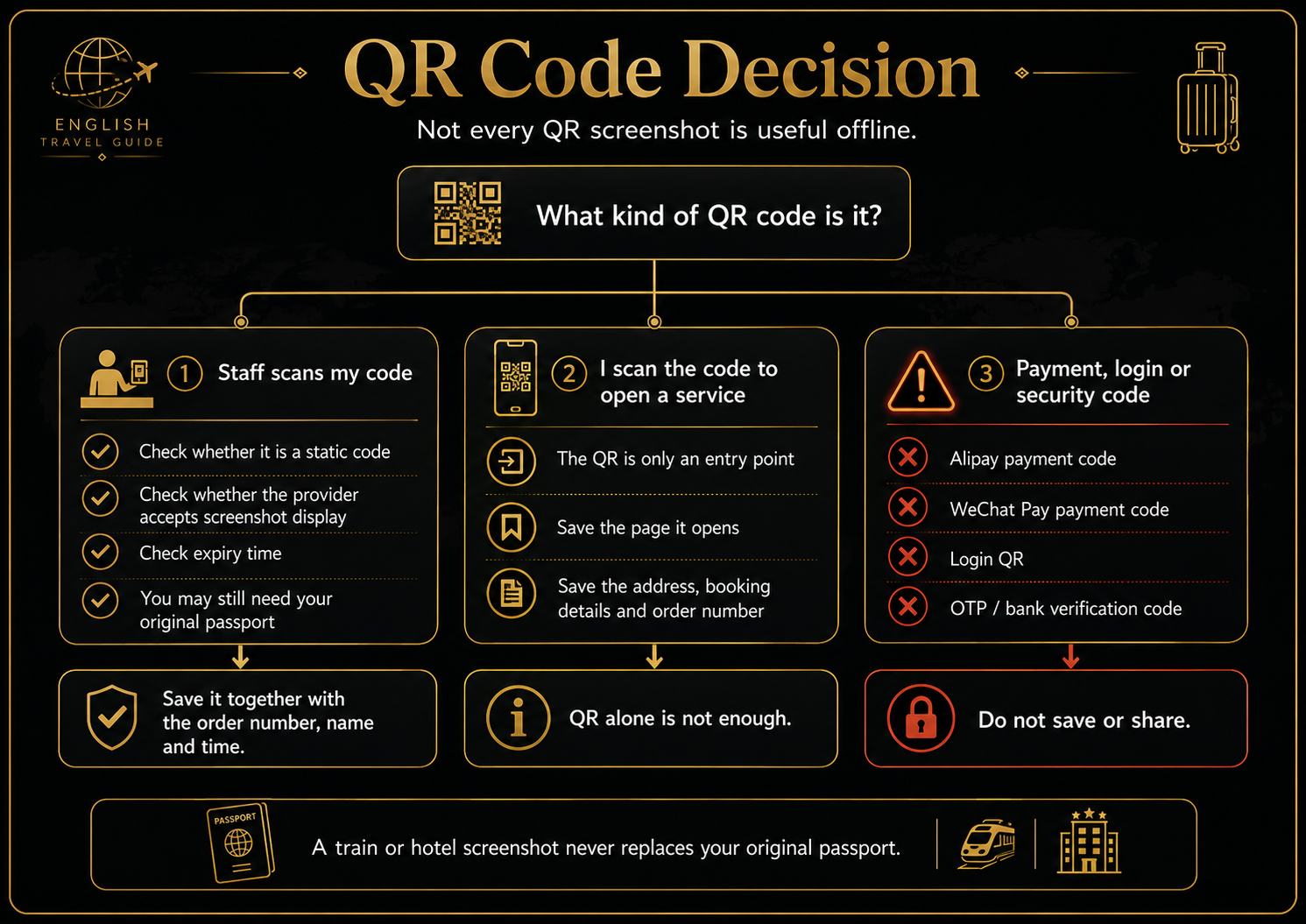
QR codes are not one category. Before saving one, ask what the code actually does.
Codes staff or gates scan from your screen
This may include an attraction ticket, event ticket, or another entry code shown to staff or a gate.
Before relying on a screenshot, check:
- whether the code is static;
- whether the provider allows screenshot display;
- whether it has an expiry time;
- whether it refreshes;
- whether the original app must be opened;
- whether the passport must also be shown.
When the provider confirms that offline display is accepted, save the QR together with the order number, name, date, and entry time.
A traveler may arrive with only a saved attraction QR and discover that it has expired. If the traveler also saved the reservation name, order number, and timed-entry details, staff may still be able to find the booking. The expired QR alone gives very little recovery information.
Codes you scan to open a service
Some QR codes are only entry points to a webpage, Mini Program, menu, registration form, or service.
Saving that QR image does not save the service behind it.
On the same phone, you may need an app that can recognize the image from the photo album. The page may still require internet, a login, or another verification step.
The safer sequence is:
- scan the code before travel when possible;
- save the useful page it opens;
- save the address, order number, and readable instructions;
- keep the original QR only as an extra reference.
Dynamic or sensitive codes
Do not save or share:
- Alipay payment codes;
- WeChat Pay payment codes;
- login QR codes;
- bank-verification codes;
- OTPs;
- SMS verification codes;
- temporary identity-authentication codes.
A screenshot of an Alipay payment code is not an offline payment method. It is both ineffective as a normal travel backup and unsafe to store or share.
Save the ticket, not the payment credential.
Which Contact Details Must Be Available Offline?
I group contacts by the problem they solve.
Arrival contacts
Save:
- first hotel;
- pickup company or transfer dispatcher;
- airline;
- railway or third-party train platform;
- attraction or activity provider.
When you book through a third party, save both the platform support route and the public contact for the actual hotel or service provider when available.
Money and connectivity contacts
Save:
- card issuer’s international support number;
- bank-card loss or freeze number;
- eSIM provider support;
- home mobile carrier;
- travel-insurance assistance.
Take these from the bank app, card, policy, booking confirmation, or official company page. Do not copy a supposed support number from a search advertisement or random forum post.
Safety contacts
Save:
- one trusted personal contact;
- your country’s relevant embassy or consulate;
110for police;119for fire;120for ambulance;122for traffic accidents.
Do not assume every emergency call will provide English service. The number is only one part of the backup; the hotel address, your location, and a translation method still matter.
Protect Sensitive Documents While Keeping Them Useful
Offline preparation should be sufficient, not excessive.
You may cautiously keep:
- a basic passport information-page copy;
- visa or entry documentation;
- insurance policy number;
- redacted booking copies;
- card brand and last four digits;
- official loss-reporting numbers.
Do not keep the following in an ordinary photo album or one unprotected folder:
- full front-and-back card images;
- CVV;
- payment or account passwords;
- OTPs;
- payment codes;
- login codes;
- a large unencrypted bundle of complete identity documents.
A passport copy can help you quote the correct details or explain a lost-document problem. It is not the valid original document required for hotel registration or passport-based rail travel.
For files you may need to show a driver or ordinary staff member, remove information that is not needed for that specific action.
Use Three Backup Layers
One phone is not a backup system.
Layer 1: the phone’s offline folder
Keep the most usable version here:
- first-night action sheet;
- address card;
- core orders;
- accepted ticket codes;
- contacts;
- backup destination.
Layer 2: an encrypted secondary copy
Use one independent place, such as:
- a second device;
- encrypted storage;
- an encrypted offline cloud folder;
- a trusted companion’s device.
A file in cloud storage is not offline just because you can see its filename. Turn off the network and open it.
Layer 3: a printed first-night card
You do not need to print the entire trip.
One page can contain:
- first hotel’s Chinese name and address;
- hotel phone;
- hotel order number;
- transfer information;
- trusted contact;
- first-night backup destination.
If the phone battery dies completely, that page can still get you to the hotel.
Travel companions should not depend on one person’s phone. Each person should have the hotel address, phone number, core order details, and a meeting plan.
For the wider first-night contingency when data or payment fails, build a first-night backup when data or payment does not work.
Run a Final Airplane-Mode Test
Do not finish by looking at the folder and thinking it seems complete.
Test it:
- turn on airplane mode;
- turn off Wi-Fi;
- do not open email;
- do not sign in to Booking.com, Trip.com, 12306, or an airline account;
- find the first hotel;
- read the full Chinese address;
- find the hotel phone number;
- find the airport transfer;
- find the arrival flight;
- find the next train or flight;
- find the core order number;
- open any static ticket code;
- find bank, platform, insurance, and emergency contacts;
- read the printed first-night card.
Then test a few failures:
- the map app will not open;
- the hotel app asks for a new login;
- email will not load;
- a QR has expired;
- the battery is at 5%;
- you and your companion are separated.
For each one, ask: What is my next action?
If you cannot complete the first-night sequence in airplane mode, the information is not truly saved offline.
After completing the full free checklist, travelers who want their actual airport or station, first hotel, transfer, internet, payment, apps, offline information, and backup path reviewed together can use a personalized China Arrival Readiness Review. It is a one-time manual pre-arrival review focused on landing through the first-night stay; it does not provide real-time travel assistance or guarantee third-party results.
Last updated: July 29, 2026. Travel platforms, entry rules, app behavior, prices, and service availability can change. Re-check official sources before departure.
Discussion
Ask a question, share recent experience, or flag information that may be outdated.
0 visible comments
No discussions yet.