High-Speed Rail
Should Foreign Travelers Book China Train Tickets Through 12306 or Trip.com?
Compare 12306 and Trip.com for China train tickets by passport verification, payment, fees, pre-orders, ticket issuance, changes, refunds and support.
Quick Answer
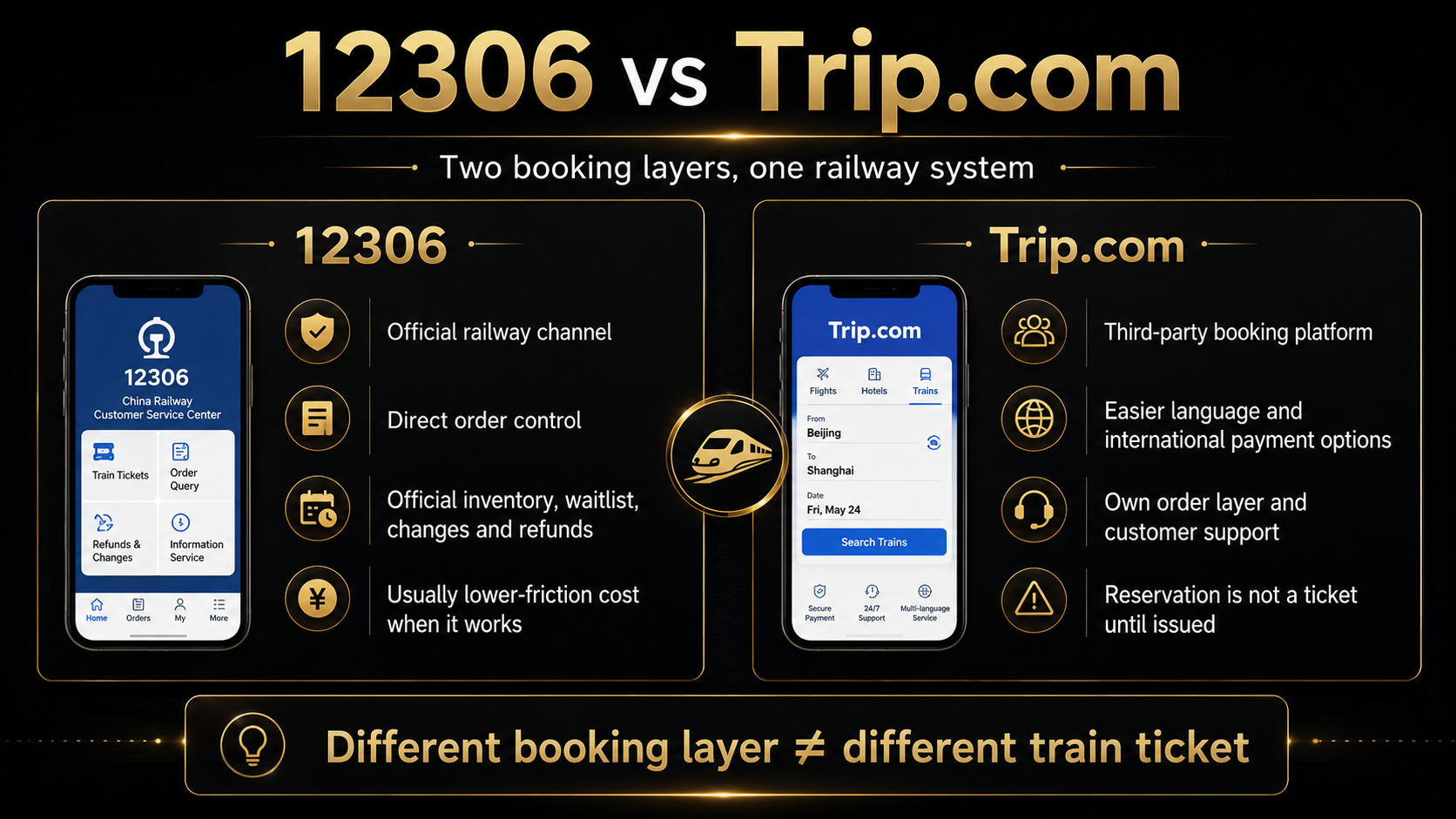
Use 12306 when your passport verification and payment work and you want the most direct control over the official railway order, real ticket inventory, waitlist, changes, and refunds. Use Trip.com when 12306 verification, payment, or interface problems are blocking the purchase, or when multilingual support and international payment options are worth the final price and after-sales conditions shown for that order.
12306 is the official China Railway booking channel. Trip.com is a third-party booking platform. Trip.com does not have a separate private supply of railway seats, and an advance reservation is not a ticket until the order clearly says the ticket has been issued.
There is no single winner for every foreign traveler. The practical choice depends on whether 12306 works for you, how many journeys you need to manage, how much the final order costs, and where you want to handle changes or refunds.
This article focuses only on choosing the booking platform. For stations, ticket sales, passport booking details, issued-ticket checks, and boarding, complete the full China train booking and boarding process.
12306 and Trip.com Are Different Booking Layers
The two platforms are not selling two different kinds of railway ticket. They are giving you two different ways to reach the same railway system.
12306: the direct railway channel
12306 is the official China Railway website and app. Its current English site accepts eligible foreign passports and provides ticket purchase, change, refund, and destination-change functions.
When you buy there, the railway order sits directly inside your 12306 account. You can check the order, use the official waitlist when available, and start a change or refund without first asking a travel platform to act for you.
That direct relationship is the main reason I normally prefer 12306 when it works.
Trip.com: a third-party booking layer
Trip.com gives you its own search page, payment options, order status, language support, and customer service. It then submits or carries out the railway purchase using the passenger details you provided.
That extra layer can be genuinely useful. A traveler may find Trip.com easier to understand, easier to pay, or easier to contact. But it also means the Trip.com order page and Trip.com’s conditions become part of the booking.
If a Trip.com order has a problem, begin with that order and Trip.com support. The 12306 English FAQ specifically says the railway department does not handle ticketing problems that happened on another website.
Different booking layer ≠ different train ticket.
Trip.com can make the booking process easier. It cannot create seats that the railway system does not have.
When Should a Foreign Traveler Use 12306?
If 12306 is working normally for you, there is no reason to leave it simply because you are traveling on a foreign passport.
Start with 12306 when:
- your passport status is ready for booking;
- your payment method works;
- you can follow the current interface;
- you have several train journeys;
- you want to manage every order in one official account;
- changes or refunds are reasonably likely;
- you want access to the official waitlist;
- you want to compare the railway’s current inventory and fare directly;
- you would rather avoid an extra third-party order layer.
Imagine that your passport has already been verified and you need four trains across several cities. The first purchase is only part of the job. You may later change one date, replace one train, or cancel one section.
Keeping all four tickets in 12306 usually makes that easier to follow. You see the railway order directly instead of moving between a platform order, platform support, and the underlying railway rules.
12306 is also the better place to start during busy travel periods if you are prepared early. It lets you watch the official sale, check actual availability, and use the official waitlist where offered.
That does not mean seats are guaranteed. It only means you are dealing directly with the system that controls them.
When Is Trip.com the Better Practical Choice?
Trip.com becomes useful when 12306 is no longer just slightly inconvenient and is actually stopping you from buying the ticket.
Consider Trip.com when:
- passport verification on 12306 remains blocked;
- your 12306 payment cannot be completed;
- you are much more comfortable with an international travel platform;
- you need a payment option available in your market;
- you prefer another language or payment currency;
- you want 24-hour platform support;
- you only need one or two straightforward journeys;
- you accept the total price and after-sales conditions shown before payment;
- you want to submit a booking request before railway sales open.
For example, suppose you only need one normal Shanghai–Hangzhou ticket, but 12306 verification has remained stuck despite correct information. There is little value in turning platform loyalty into a travel problem. If Trip.com accepts the correct passport details, takes your payment, and shows reasonable terms, it can solve the purchase.
The important point is what Trip.com is solving:
It solves an interface, verification, payment, or support problem. It is not a shortcut to hidden railway inventory.
If the train is sold out in the railway system, Trip.com cannot manufacture another seat.
A Trip.com Reservation Is Not an Issued Train Ticket
This is the distinction that matters most.
Trip.com currently allows travelers to place train bookings well before the normal railway sale window. China mainland and Hong Kong high-speed rail tickets are generally displayed as available within 15 days of departure, while Trip.com may accept the request earlier.
That earlier request is useful, but it does not mean a seat has been locked.
| Order stage | What it really means | Can you treat it as a ticket? |
|---|---|---|
| Search result | The platform is showing a train and possible fare | No |
| Reservation or pre-order | Trip.com has recorded a future purchase request | No |
| Purchase attempt pending | The platform is waiting or trying to buy | No |
| Ticket issued | The railway purchase succeeded | Yes |
| Purchase failed or refunded | No usable ticket was obtained | No |
What happens to an early reservation?
When railway inventory becomes available, Trip.com attempts the purchase. Success still depends on the seats that actually exist at that moment.
A displayed success estimate, recommendation, or booking request is not the same as an issued ticket.
A traveler may submit a Trip.com reservation a month before departure and assume the seat is already secure. In reality, the platform may only begin the real purchase when railway sales open.
Do not build an inflexible connection around “pending”
A pending train order should not be the foundation for a non-refundable flight, a tightly timed airport transfer, or another train that leaves little recovery time.
The risky pattern is simple:
- the Trip.com order still says pending;
- the traveler assumes it will definitely issue;
- the next booking is made non-refundable;
- the train purchase later fails.
Until you see an issued ticket, keep the surrounding plan flexible.
What should you check after issuance?
Do not stop at a generic success message. Check:
- train number;
- travel date;
- departure station;
- arrival station;
- seat class;
- passenger name;
- passport number;
- carriage and seat or berth information, when shown;
- final ticket status.
Only a clearly issued order should be treated as a secured railway ticket.
Which Platform Costs Less?
12306 will normally be the cleaner price comparison because it does not add a separate travel-platform booking layer.
That does not mean every action on 12306 is free. Railway change and refund fees can still apply, depending on timing, the original ticket, the replacement train, and the current rules.
Trip.com pricing is harder to summarize with one percentage or fixed amount. The result may differ by market, currency, order type, campaign, optional product, and whether manual assistance is involved.
One Trip.com page may advertise no booking fee, while the specific refund or change terms for an order may state that a booking fee is non-refundable or that manual processing can cost extra. The checkout page and order conditions matter more than a general claim about Trip.com fees.
Before paying, compare:
- the underlying railway fare;
- any platform or booking charge;
- optional insurance or add-ons;
- the payment currency;
- your bank’s exchange rate;
- any foreign-transaction fee;
- which charges are not refundable;
- the final total for every passenger.
I would not compare the first search-page price. I would compare the final amount due for the same passenger, train, date, and seat class.
Payment, Passport Verification and Passenger Details
Both platforms still operate under real-name railway ticketing.
Using 12306
The 12306 English site currently accepts valid foreign passports that meet its requirements. You need the relevant account and passenger record to be in a state that allows booking, and you still need a payment method that works.
If the passport status is busy, pending, or failed, do not turn this comparison article into a long sequence of random edits. Use the dedicated guide to troubleshoot a busy, pending or failed 12306 passport verification.
Using Trip.com
You usually do not need to maintain your own 12306 account when Trip.com handles the booking. You still need to submit the passenger’s real passport information accurately.
The full name must match the passport. The passport number must be correct. Trip.com cannot transform incorrect passenger data into a valid railway ticket.
A normal ticket change is for the journey details permitted by the railway rules. It is not a simple way to replace one passenger name with another or repair a badly entered identity.
Check every passenger before payment, especially when buying several tickets together. Carry the same original passport used in the booking when you travel.
Changes, Refunds and Customer Support
Many travelers choose a platform based only on how easy the first purchase looks. I would also ask where you want to deal with the order when the itinerary changes.
The practical rule is:
Start the after-sales process on the platform where you bought the ticket.
If you bought through 12306
Use the 12306 order center to check the ticket and begin an eligible change or refund. Current railway rules still control availability, deadlines, and fees.
If the online route is not available for the ticket, you may need 12306 support or a station ticket office.
The benefit is that there is no separate booking platform between you and the railway order.
If you bought through Trip.com
Start inside the Trip.com order page and use Trip.com support when needed.
Railway change and refund rules still apply, but the platform may also have:
- its own processing window;
- a manual process;
- a non-refundable booking charge;
- an additional handling condition;
- time needed for support to process the request.
Do not wait until the last few minutes before departure to ask a third party to change or refund a ticket.
A common mistake is buying on Trip.com and then contacting 12306 first. The railway can see the railway ticketing system, but Trip.com still controls the platform order, payment record, and platform fees. The traveler usually ends up returning to Trip.com after losing time.
Which Platform Fits Your Trip?
| Traveler situation | Recommended starting platform | Why | Main limitation |
|---|---|---|---|
| Passport verified and several train journeys | 12306 | Direct management of multiple railway orders | You must complete the account and payment setup |
| 12306 verification or payment is blocking purchase | Trip.com | It may remove the current purchase barrier | Extra platform terms and possible charges |
| One or two simple journeys | Either | Compare convenience and final price | You still need to confirm issuance |
| Multiple cities and likely itinerary changes | 12306 | Direct control is more useful later | The initial setup may take more effort |
| Booking before railway sales open | Trip.com reservation | Lets you submit the request early | It is not guaranteed and not yet a ticket |
| Peak holiday or popular train | Prepare 12306 early | Direct view of official sale and waitlist | Seats are still not guaranteed |
| Traveler who needs multilingual support | Trip.com | Easier language, currency, and platform support | Support cannot create railway inventory |
| Traveler who wants direct after-sales control | 12306 | The order stays inside the official channel | You handle the railway process yourself |
My own rule is straightforward:
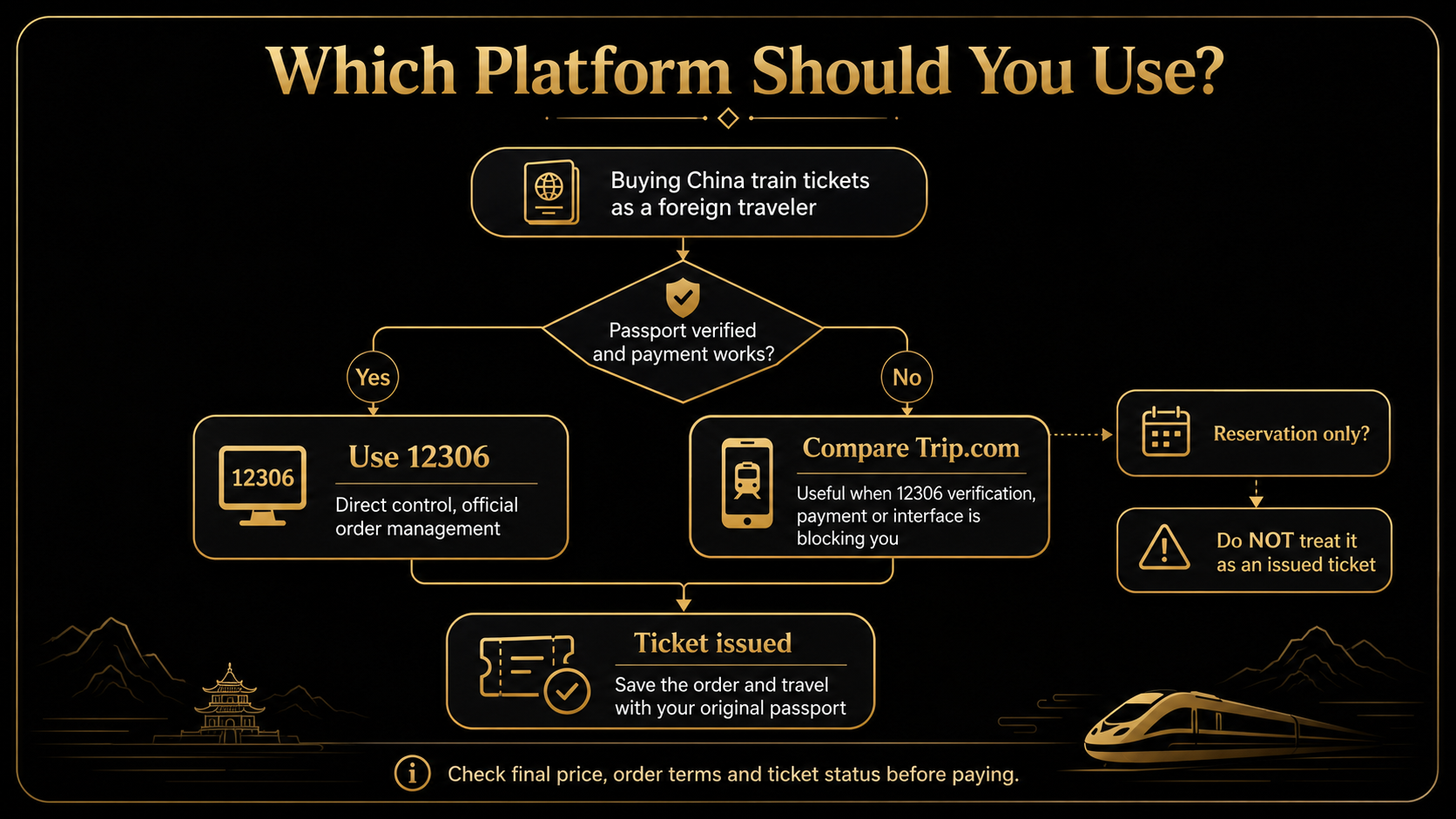
If 12306 works, use it as the main platform. If 12306 is blocking a real purchase, compare Trip.com and use it when the convenience is worth the terms.
Do not submit the same passenger, date, and train on both platforms as a form of insurance. A valid ID can hold only one ticket for the same train on the same date. Dual-platform attempts can also leave one order issuing while the other remains pending or begins a refund.
12306 or Trip.com is only one part of your travel setup. Before departure, prepare the core China travel apps before departure.
Final Booking Checklist Before You Pay
Before paying:
- check the exact departure and arrival stations;
- check the train number and date;
- check every passport name;
- check every passport number;
- confirm whether the order is a reservation or an issued ticket;
- compare the final total price;
- check which charges are refundable;
- locate the change and refund route;
- place the real order on only one platform;
- save the order and issuance proof;
- travel with the same original passport used for booking.
The platform choice does not replace route, station, and connection planning. You may also need to plan high-speed rail within your wider China transport strategy.
Use 12306 for direct control when it works. Use Trip.com when its convenience solves a real verification, payment, or support problem. Whichever platform you choose, the journey is not secure until the ticket is actually issued.
Last updated: July 29, 2026. Travel platforms, entry rules, app behavior, prices, and service availability can change. Re-check official sources before departure.
Discussion
Ask a question, share recent experience, or flag information that may be outdated.
0 visible comments
No discussions yet.