
Alipay
Alipay Not Working in China? How Foreign Tourists Can Fix Card and Payment Problems
Alipay card already linked but payment still fails? This guide helps foreign tourists diagnose card-linking, identity-verification, merchant QR and payment-decline problems in China.

Quick Answer
If Alipay is not working, first identify where it fails. A card that will not link is a different problem from a card that is linked but declined at checkout. A payment that works at one merchant and fails at another is different again.
For most foreign tourists, the fastest troubleshooting order is:
- Check whether the problem is card linking, identity verification, or the payment itself.
- Look in your banking app for a declined or pending transaction.
- Confirm that international, online, and card-not-present payments are enabled.
- Try the other Alipay payment method: show your payment code instead of scanning, or scan instead of showing your code.
- Try a second card or another payment option.
- If the app requests identity verification, complete it only inside the official Alipay app.
- Keep some RMB cash available so one failed transaction does not become an emergency.
Official Chinese payment guidance says overseas visitors can use mobile payment apps, bank cards, and cash. Foreign users can link eligible international cards to Alipay, but every card and transaction is still subject to approval.
Important: App menus, supported cards, verification requirements, fees, and transaction limits can change. Treat the instructions shown inside the official Alipay app and by your card issuer as the final authority.
Why a Linked Card Can Still Fail
Many travelers assume that once an international card appears inside Alipay, the setup is finished. In reality, adding the card is only the first checkpoint.
A real payment may still involve several separate decisions:
- Alipay checks the account, device, identity status, and transaction.
- The merchant's payment setup determines what type of transaction is being requested.
- The card network routes the payment.
- Your issuing bank decides whether to approve it.
- A security system may request extra verification or block an unusual transaction.
That is why a card can be linked successfully and still fail at a restaurant, attraction, or small shop.
China Travel Hacks reviewed 1,489 traveler-question records, including 123 that mentioned Alipay. Recurring themes included passport verification, international-card linking, post-setup declines, merchant-specific failures, and backup-payment concerns. The dataset identifies traveler pain points; it is not a scientific survey, and community comments are not treated as official rules.
Find the Failure Point First
Do not repeatedly delete and re-add your card without knowing which stage is failing. Use this quick diagnosis.
| What you see | Most likely area to check first |
|---|---|
| The card cannot be added | Card details, supported card type, billing information, bank settings |
| The card is linked, but payment is declined | Issuing bank, transaction security check, merchant payment type |
| Payment works at one merchant but not another | Merchant QR code or checkout configuration |
| The app asks for more identity information | Passport details, photo quality, account-name consistency |
| The app works on Wi-Fi but not mobile data | SIM/eSIM data, app permissions, VPN or network settings |
| No payment method works at the counter | Use a second card, another app, physical card, or RMB cash |
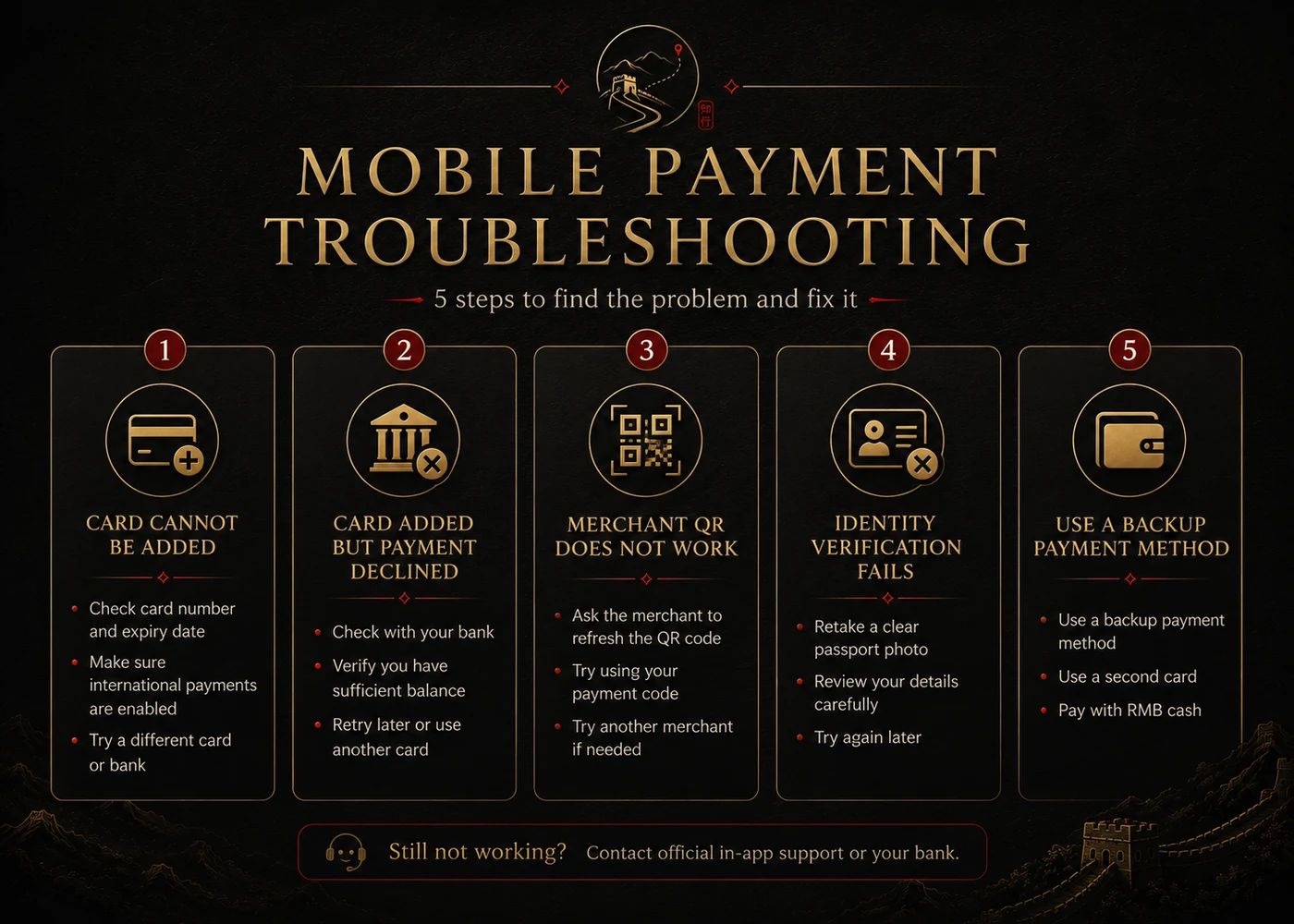
Problem 1: Your International Card Cannot Be Added
Start with the basic information. A single incorrect digit, name mismatch, expired card, or disabled online-payment setting can stop the card before a real transaction is attempted.
Check the Card Details Carefully
Confirm:
- Card number
- Expiration date
- Security code
- Cardholder name
- Billing information, if requested
- Country or region selected in the app
Use the name format accepted by your bank. If your passport contains several names, do not invent abbreviations. The name on the Alipay account, passport verification, and bank card should be as consistent as possible.
Check Your Bank Settings
Open your banking app and look for settings such as:
- International transactions
- Online purchases
- Card-not-present payments
- Overseas usage
- Security or regional controls
- Spending limits
Some banks require a one-time confirmation when a card is added to a digital wallet. If your banking app shows no request or declined event, ask the bank whether it can see an attempted wallet verification.
Try a Different Card
A card can fail because of the issuer, card type, country of issue, security rules, or temporary risk controls. A second card from a different bank is more useful than two cards issued by the same bank.
Credit cards often provide stronger overseas support than some debit, prepaid, or virtual cards, but no card type is guaranteed. The app's current prompts determine whether a particular card is eligible.
Problem 2: The Card Is Linked but the Payment Is Declined
This is one of the most common and confusing situations.
Check Whether the Bank Saw the Transaction
Open your banking app immediately after the decline.
If the bank shows a declined transaction: the request probably reached the issuer. Check for a fraud alert, overseas-payment block, spending limit, insufficient available credit, or request for approval.
If the bank shows a pending approval: approve it, then wait before trying again. Repeating the payment many times can create several temporary authorizations.
If the bank shows nothing: the failure may have occurred before the request reached the issuer. The merchant's QR setup, Alipay risk controls, account verification, or the transaction type may be involved.
This simple check prevents you from wasting time calling the bank about a transaction it never received.
Try a Smaller, Ordinary Purchase
A small payment at a staffed convenience store or chain cafe can be a useful test. Avoid using an expensive hotel bill, train booking, or urgent taxi ride as your first transaction.
A small successful payment confirms that the card, bank, account, and device can complete at least one normal merchant purchase. It does not guarantee every future transaction.
Do Not Keep Retrying Rapidly
Several identical attempts in a short period can trigger security controls. Read the full error, check the banking app, confirm the merchant and amount, wait briefly, and change only one variable at a time.
Problem 3: One Merchant Works and Another Does Not
A displayed QR code does not mean every funding source and payment scenario will work.
Merchant Payment Versus Personal Transfer
Some QR codes represent a normal merchant purchase. Others may function more like a person-to-person transfer or a different collection method.
An overseas-card-funded Alipay account may not support every transfer scenario. If the app treats the request as a transfer instead of a merchant purchase, ask the seller whether they have a standard merchant payment code or a normal checkout terminal.
The same card may work normally at the next shop.
Try Both Payment Flows
There are two common in-person flows:
You scan the merchant's code
- Open Scan in Alipay.
- Scan the code.
- Confirm the merchant name.
- Enter or verify the amount.
- Approve the payment.
The merchant scans your payment code
- Open the Pay function.
- Display your payment code.
- Let the cashier scan it.
- Verify the amount and confirmation.
If one method fails, ask whether the merchant can use the other. Do not show a payment code to an unknown person outside a genuine purchase.
Confirm the Merchant Name and Amount
Before approving, check:
- Merchant name
- Amount
- Currency
- Whether the payment is marked as a purchase
- Whether the app requests unexpected information
Cancel the transaction if the merchant name or amount is clearly wrong.
Problem 4: Passport or Identity Verification Fails
Identity verification is not just a formality. It can affect account access, payment features, transaction limits, and security reviews.
Use a Clear Passport Image
For the best chance of success:
- Place the passport flat.
- Use bright, even lighting.
- Avoid glare on the photo page.
- Keep all four corners visible.
- Do not cover text with fingers.
- Make sure the passport has not expired.
- Use the original document rather than a screenshot or edited image.
If the app requests a live photo or face check, follow the on-screen instructions in a well-lit area.
Match Your Details Exactly
Review:
- Full name
- Passport number
- Nationality
- Date of birth
- Expiration date
- Document type
Use the name format requested by the app. If verification repeatedly fails, use official in-app support instead of changing identity information randomly.
Protect Sensitive Information
Only submit passport and card information inside the official app or an official support workflow.
A shop employee, driver, tour guide, online stranger, or unofficial "helper" does not need:
- Your SMS code
- Card security code
- Payment password
- Full card photograph
- Account login
- Unredacted passport copy sent through chat
Problem 5: The Phone, Network, or App Is the Real Issue
A payment problem is not always a banking problem.
Check Mobile Data and App Permissions
If Alipay works on hotel Wi-Fi but not outside, confirm:
- Mobile data is active.
- The correct SIM or eSIM is selected for data.
- Alipay is allowed to use mobile data.
- Data roaming is enabled when required.
- Battery-saving mode is not blocking the app.
- The app is updated from the official app store.
A data-only eSIM may provide internet but no phone number or SMS service. Keep access to the number used for Alipay registration in case a verification code is required.
Temporarily Check VPN and Security Apps
A VPN, private DNS service, or aggressive security app can interfere with connections. Test whether the issue changes after safely disconnecting the VPN or switching networks.
Keep Your Phone Charged
Your phone may hold payments, maps, tickets, translation, and ride-hailing access. Carry a charged power bank and cable.
What to Do When Payment Fails at the Counter
When people are waiting behind you, random troubleshooting makes the situation more stressful. Use a fixed order.
- Check the amount and merchant name.
- Read the complete error message.
- Check your banking app for a decline or approval request.
- Try the other Alipay payment flow.
- Try your second linked card.
- Use another prepared mobile payment option, if available.
- Ask whether the merchant accepts a physical international card.
- Pay with RMB cash.
- Save the receipt and transaction record if the result is unclear.
Do not send a second payment until you know whether the first attempt failed or is pending. A pending bank authorization is not always a completed merchant payment.
Build a Payment Backup System
Prepare several independent options rather than searching for one perfect payment method.
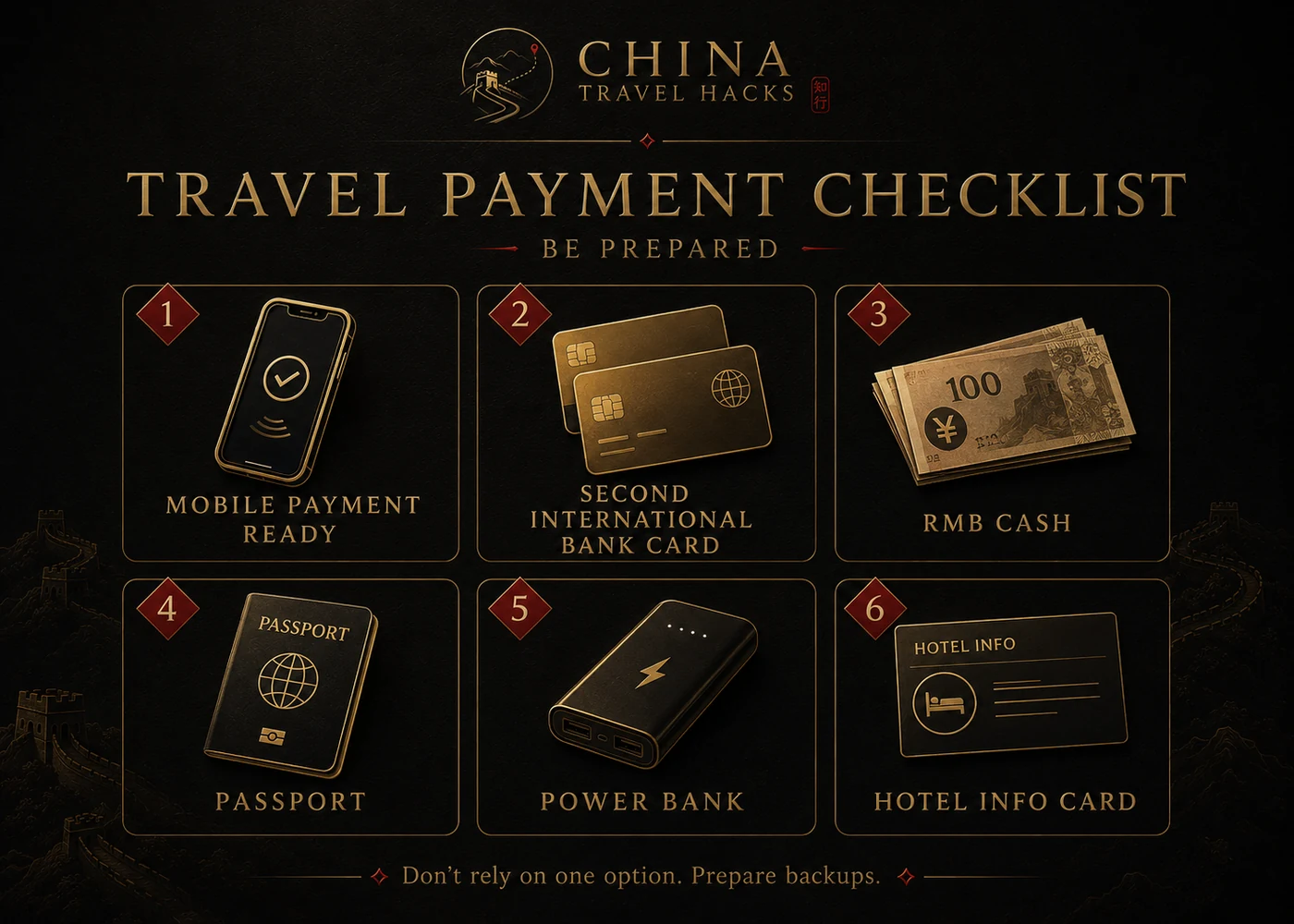
Recommended Setup
- Alipay configured before departure
- A second card from another bank
- Another mobile payment option if you can set it up
- A physical international card
- A modest amount of RMB cash
- Access to your banking app
- Your bank's international support number
- A power bank
- Hotel name and address saved in English and Chinese
Cash is not a failure. It is a practical backup for a dead phone, network outage, bank decline, or unsupported transaction.
For other pre-trip resources, browse the China Travel Guides and the Vetted China Travel Tools.
Test Before You Depend on It
You may not be able to complete a normal mainland-China merchant payment before arrival, but you can reduce uncertainty before departure.
Before Flying
- Download Alipay from the official app store.
- Register with a phone number you can continue to access.
- Complete identity verification if requested.
- Add at least two eligible cards.
- Confirm international and online transactions are enabled.
- Install your banking apps.
- Make sure you can receive security notifications.
- Save official in-app support access.
- Prepare some RMB cash or a plan to withdraw it.
- Save hotel information offline.
After Arrival
Use a small, ordinary purchase as your first test. Do not wait until you are checking into a hotel late at night or trying to catch the last train.
Frequently Asked Questions
Can foreign tourists link international cards to Alipay?
Official Chinese guidance states that foreign users can link eligible international cards, including Visa and Mastercard, to Alipay. Eligibility and approval still depend on the app, issuer, card type, account, and transaction.
Does a linked card mean Alipay will work everywhere?
No. Linking confirms only that the card was accepted at the setup stage. Individual payments can still be affected by the issuing bank, merchant configuration, account verification, transaction type, network, or security controls.
Why does Alipay work at a chain store but fail at a small shop?
The two merchants may use different QR-code or checkout configurations. One may be processed as a standard merchant purchase while another request may not support your overseas-card funding source.
Should I use a credit card or debit card?
Use an eligible card your issuer supports for international and online transactions, and carry a second card from a different bank.
Can I use an overseas phone number?
Chinese government guidance has stated that foreign users can register Alipay with foreign mobile phone numbers and link foreign bank cards. You must keep access to that number for account recovery or security codes.
Should I carry RMB cash?
Yes. Official payment guidance for overseas visitors includes cash as one of the available payment options. Carry a practical amount in smaller notes, not your entire travel budget.
What if Alipay asks for another verification after it worked before?
Complete the request only inside the official app. Security reviews can be transaction-specific. Review the requested information carefully and use official in-app support if the request repeatedly fails.
Should I let someone else set up the account for me?
They can explain the steps, but you should enter sensitive information yourself. Never share your password, SMS code, card security code, or complete passport image through an unofficial chat.
Final Checklist
Before leaving for China, confirm that you have:
- Alipay installed from the official app store
- Continued access to your registration phone number
- Correct passport details
- At least two eligible cards from different banks
- International and online payments enabled
- Banking-app access and alerts
- A charged power bank
- RMB cash for backup
- Hotel information saved offline
- A plan for contacting official app support or your bank
The goal is not to guarantee that every payment will work. The goal is to make sure that one failed payment does not stop your trip.
Sources and Methodology
This article was informed by an internal China Travel Hacks dataset of 1,489 traveler-question records collected from travel communities and search results. Community reports were used to identify recurring problems, not as authoritative statements of policy.
Official information was checked against:
- Payment service guide for overseas visitors to China
- Responses on services available to foreigners in China
- Guide to Payment Services in Beijing
- Payment methods for foreigners in Shanghai
Information checked: June 24, 2026.
China Travel Hacks is an independent travel-information website. It is not affiliated with Alipay, Ant Group, any bank, card network, or Chinese government agency.
Last updated: July 5, 2026. Travel platforms, entry rules, app behavior, prices, and service availability can change. Re-check official sources before departure.
Discussion
Ask a question, share recent experience, or flag information that may be outdated.
0 visible comments
No discussions yet.